

For a long time, improving an image meant opening Photoshop and knowing exactly what you were doing. Layers, masks, curves, clone stamps. If you did not understand those tools, even simple edits felt complicated.
That is no longer the case.
Today, many common editing tasks can be handled directly in a browser. You upload an image, choose the adjustment you need, and the system processes it automatically. No installation, no complex interface, no technical learning curve.
So what kinds of image improvements can realistically be done online, and how do these tools work?
Improving Image Quality Online
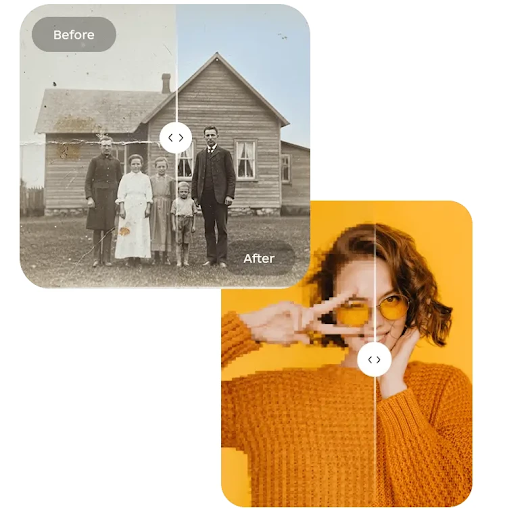
One of the most common problems people face is low quality images. Photos taken in poor lighting, compressed downloads, or older files often look soft or noisy.
Online enhancement tools use trained models to analyze edges, textures, and fine detail. Instead of simply sharpening everything, they distinguish between noise and actual structure. The goal is to restore clarity without making the image look artificial.
This process is especially useful for product photos, profile pictures, or marketing visuals that need to look clean but were not captured in ideal conditions.
The important thing to understand is that enhancement tools do not create unlimited new detail. They refine what is already present. Starting with a reasonable resolution image always leads to better results.
Removing Backgrounds Without Manual Masking
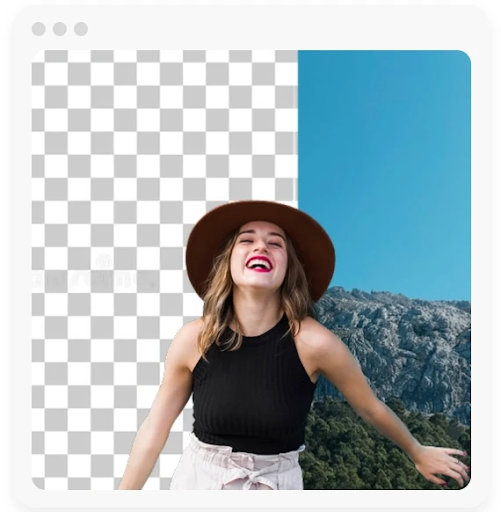
Background removal used to be one of the most time-consuming tasks in editing. Manually tracing the edges of a subject required patience and precision.
Modern online tools approach this differently. They detect the main subject automatically and separate it from the background. The process relies on object recognition and edge detection models trained to understand shapes, people, and common objects.
For straightforward images with clear separation between subject and background, the result can be clean enough for professional use. More complex scenes may still require adjustments, but the heavy work is done instantly.
This has made it significantly easier to prepare images for e-commerce listings, presentations, and social media content.
Cleaning Up Small Imperfections
Another common need is removing distractions. This might include small objects, text overlays, dust spots, or unwanted elements in the background.
Instead of manually cloning nearby pixels, modern cleanup tools reconstruct the selected area based on surrounding patterns. They analyze texture, lighting, and structure to predict what should appear behind the removed object.
The success of this process depends on context. Smooth surfaces such as walls or sky are easier to rebuild. Highly detailed textures require more careful selection.
Still, for many everyday cases, online cleanup tools reduce what used to be a lengthy manual process to a quick adjustment.
Adjusting Lighting and Color
Basic corrections such as brightness, contrast, and color balance are now often automated. Instead of manually tweaking sliders without guidance, some online editors analyze the image and apply balanced adjustments.
This does not replace full professional color grading, but it is effective for quick improvements. Slight underexposure, flat contrast, or dull colors can often be corrected with minimal effort.
The advantage here is accessibility. Users do not need to understand technical color theory to improve the overall appearance of an image.
Working Without Photoshop
There are still situations where advanced desktop software is necessary. Complex compositing, detailed retouching, and commercial design work often require precise layer control.
However, many everyday editing tasks no longer justify that level of complexity. Preparing a product image, cleaning up a quick photo, or enhancing a draft visual does not always require professional software.
Browser-based tools are particularly useful for people who:
- do not want to install heavy programs
- work across multiple devices
- need fast results
- handle simple but repetitive editing tasks
The editing experience is focused on outcomes rather than technical processes.
How Online Editors Handle Performance
A common concern is whether online tools can handle high resolution images. Modern platforms process images on cloud servers rather than relying entirely on the user’s device. This allows for more advanced computation without slowing down local performance.
Export options vary between tools. Some maintain original resolution, while others apply compression. Reviewing output settings is important if image quality is a priority.
A clean interface and clear preview options make it easier to assess results before final download.
Choosing the Right Type of Tool
When selecting an online editor, clarity matters more than feature count.
Some platforms specialize in a single task, such as background removal. Others combine multiple functions in one workspace. An integrated approach can save time if you regularly perform several adjustments on the same image.
For example, instead of switching between separate services to enhance, clean up, and adjust an image, platforms like Phototune bring those features together in a single online environment. This simplifies workflow without introducing unnecessary complexity.
The best tool is not necessarily the one with the most buttons, but the one that produces natural results and fits your typical editing needs.
The Shift Toward Simpler Editing
What stands out in 2026 is not just technical progress, but a change in expectations. Users increasingly expect editing to be fast and intuitive.
The focus has shifted from learning tools to achieving results. Remove this object. Improve that lighting. Clean up this background.
Behind the scenes, complex processing still happens. But the user experience is designed to reduce friction.
For many everyday tasks, this approach makes more sense than opening a full professional editing suite.
In Practice
Improving and cleaning up images online is no longer a compromise. For common editing needs, modern tools provide results that are efficient and visually convincing.
They are not replacements for every professional workflow. But they are practical solutions for a wide range of real-world use cases.
As image processing models continue to evolve, the distinction between desktop editing and browser-based editing becomes less about capability and more about preference.
For many users, convenience and speed now outweigh the complexity of traditional software.

